
SMARK GLOBAL|AI HEADQUARTERS
Enterprise AI collaboration and operations management
Integrate enterprise AI teams and see the whole of group operations.
AI Headquarters & CEO AI Cockpit
Bring together enterprise knowledge, workflows and management information to build AI teams with clear responsibilities. Through the CEO AI Cockpit, review progress, pending approvals and operating risks across departments and branches in one place, supporting evidence-based management decisions.
Turn enterprise knowledge into team capability, and operating information into a basis for management.
Functions and automation scope are set by data, system integration, permissions and acceptance requirements.

As the business scales, management information must be integrated in step.
When departments and branches use different data, standards and reporting, management cannot see a consistent operating picture.
Dispersed enterprise knowledge
Working experience depends on individuals, so standards and guidance are hard to apply consistently across teams.
Fragmented cross-department information
Customer, sales and operating data sit in different systems, adding reconciliation and coordination work.
Approvals and follow-up are not integrated
Pending approvals, overdue tasks and unfinished work are not shown together, making it harder for management to set priorities.
AI Headquarters connects enterprise knowledge with daily work; the CEO AI Cockpit integrates management information and approval needs.
These are the management situations the solution addresses; they are not client quotations or evidence of results.
Enterprise AI collaboration
Manage AI teams centrally, with clear task allocation and execution progress.
Establish AI work roles to suit the enterprise, specifying data sources, work standards, deliverables and owners, with checking and approval built into the workflow.
- Team responsibilities and tasks
- Work outputs and data sources
- Pending items and follow-up ownership
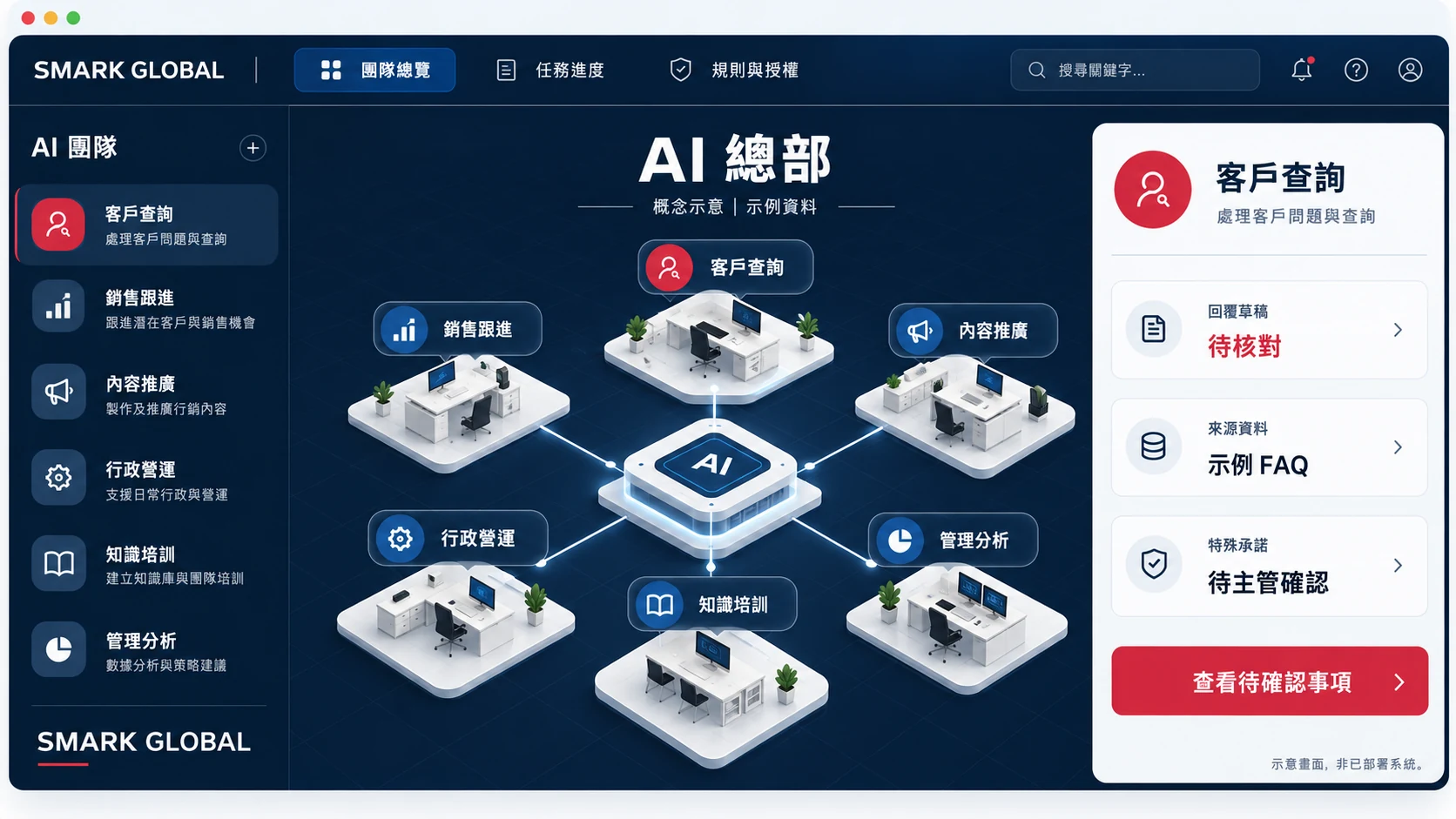

Customer service
Organises enquiries and reply drafts from approved service information, citing sources and items to confirm.
- Reference inputs
- FAQs, service information, authorised enquiries
- Designable outputs
- Enquiry classification, reply drafts, source citations
- Human management requirements
- Special commitments, refunds and external sending require authorised approval
Sales support
Organises customer background, follow-up records and next-step suggestions for consistent sales follow-up.
- Reference inputs
- Conversations, sales stages, follow-up criteria
- Designable outputs
- Customer summaries, follow-up suggestions and drafts
- Human management requirements
- Discounts, contracts and external contact handled by authority
Marketing
Prepares reviewable content and campaign plans from brand guidelines and approved product information.
- Reference inputs
- Brand guidelines, product information, objectives
- Designable outputs
- Themes, copy and content plans
- Human management requirements
- Claims, copyright and publication require review
Administration & operations
Organises work data, checks for gaps and prepares handover documents to support standardised processes.
- Reference inputs
- Forms, work guidelines, process rules
- Designable outputs
- Data summaries, gap lists, handover documents
- Human management requirements
- Personal data, permissions and system writes require confirmation
Knowledge & training
Turns enterprise experience and approved practice into work guides, sourced answers and practical exercises.
- Reference inputs
- Work standards, examples, responsibility charts
- Designable outputs
- Work guides, answers and checklists
- Human management requirements
- Manager approval, version updates and competency assessment
Management analysis
Prepares operating summaries and discussion items from consistent metric definitions and available reports.
- Reference inputs
- Reports, metric definitions, management objectives
- Designable outputs
- Management summaries, variance flags and discussion items
- Human management requirements
- Data quality, root-cause analysis and decisions confirmed by owners
The six are application directions to assess, not a ready-made full feature set. Automated notifications, scheduling, system writes and external sending require the corresponding integration, authorisation, error handling and acceptance.
Explore AI team applicationsCEO AI Cockpit
Integrate group operating information to support management decisions.
Present task progress, pending approvals and data status from connected departments and branches in one place. Management can review work by group, region, department or branch, check data sources and owners, and set follow-up and approval priorities.
Group operations overview
Review task status, completion and follow-up ownership across connected departments and branches.
Design and implementation requirements:Unified status definitions, sources, update frequency and data scope
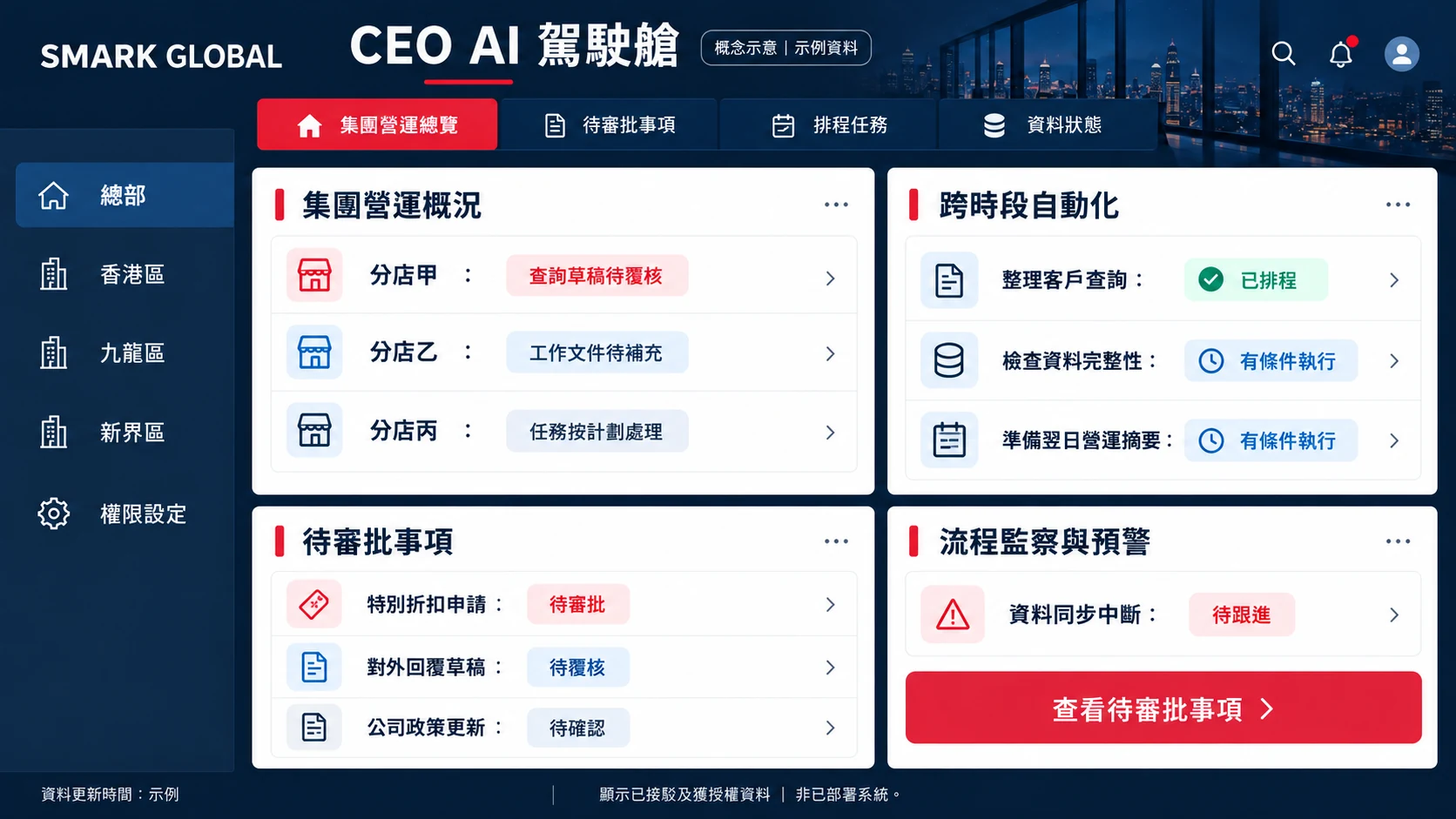
It presents authorised business tasks and data; it does not by default give access to all staff data or private communications. Tiered permissions, traceability and alerts are requirements to design and accept, not claims of a system in operation.
Assess group management useConnect headquarters, regions and branches with consistent work standards.
Headquarters–branch collaboration
Headquarters approves service guidelines and policies; branches work from the same basis, and exceptions go to a designated manager.
Cross-department handover
Link handover requirements across customer service, sales, administration and operations, specifying required data, completion standards and owners.
Tiered approvals
Design approval flows by work type, region or delegated limit, so important decisions are not mixed with routine work.
Unified management reporting
Prepare operating summaries using consistent metrics, status definitions and update times; cross-branch comparison requires first checking that data are comparable.
Actual scope is confirmed jointly by the relevant management, operations, IT and data owners.
Discuss cross-department and branch useCross-hours workflows
Support cross-hours operation and prepare operating information for the next working day.
For processes suited to scheduling, data preparation, drafting and status monitoring can be designed within scope. Matters involving external commitments, important judgements or approvals remain with designated people.
- Customer enquiry preparationClassify new enquiries from authorised channels, cite service information and prepare drafts for review.
- Data completeness checksCheck for missing, overdue or failed items by rule and compile a follow-up list.
- Next-day operating summaryConsolidate connected tasks and pending items, with sources and update times.
- Designated status monitoringCheck agreed system events, and flag clearly when data are unavailable or sync is interrupted.
24/7 scheduling and monitoring must be designed around interfaces, authorisation, vendor availability, alerting and support arrangements; it is not a guarantee of uninterrupted service or round-the-clock human support.
Assess cross-hours automation
From source citation to delivery review: a complete workflow.
Concept example | Simulated data | Not connected to a real system
Step 1/4 · Receive enquiry
Enter the enquiry and select the approved work standard.
S.M.A.R.K. implementation
Start with a clear scope and build enterprise AI capability step by step.
- S
Scan
Assess processes, data, systems and permissions, and choose one type of work or one department/branch as a pilot.
Suggested output:Current-state report and process-barrier analysis
- M
Map value
Define work standards, responsibilities, scope and acceptance methods.
Suggested output:Implementation priorities and acceptance criteria
- A
Activate
Build work roles with authorised samples and arrange practical team testing.
Suggested output:Pilot plan and test records
- R
Reconnect
After the pilot passes, connect existing systems, workflows and management interfaces as needed.
Suggested output:Accepted data flows and handling rules
- K
Keep improving
Arrange data updates and internal owners, and review usage, errors and maintenance effort.
Suggested output:Update ownership and regular review arrangements

From a workflow pilot to cross-department and group-wide use.
Workflow pilot
Choose one type of work and establish work standards, authorisation and approval requirements, source citation, delivery checks and practical training.
AI teams and management interface
Based on confirmed needs, build role allocation, workflows, cockpit information and required system integration, with error handling and acceptance requirements defined.
Ongoing adoption and improvement
Arrange training, usage and error reviews, rule updates and subsequent implementation priorities.
Proposals and quotations are based on work scope, data preparation, system integration, management requirements and support needs.
Enquire about scopeCombining enterprise systems integration and team training to support practical AI use.
Smark Global is a Hong Kong AI transformation and enterprise systems integration company whose services combine strategy, pilots, systems integration, governance and corporate training. This solution starts from real enterprise work, aligned with management requirements and team adoption, to build AI working methods that can be reviewed and improved.
Historical systems projects are not evidence of AI results for this new solution.
Frequently asked questions
Plan AI collaboration and operations management for your enterprise.
Discuss your management goals, existing systems and priority workflows with us to assess a suitable pilot scope and implementation sequence.
Please describe the work first; do not submit customer personal data or confidential documents.